Upgrading Lightning Review
Overview
This section explains how to upgrade Lightning Review.
How to upgrade
You can upgrade Lightning Review using one of the following methods.
Upgrading from the installer
After extracting the downloaded program, run LightningReviewSetup.exe.
There is no need to uninstall the old version of Lightning Review.
Automatic version upgrade
Lightning Review has an "automatic update function" that periodically checks whether the latest version has been released and, if it has been released, upgrades the version.
After launching Lightning Review, if the latest version is available, you will be notified as follows.
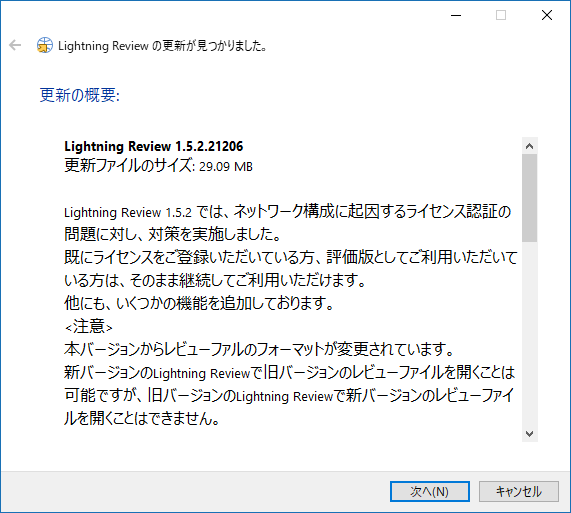
Click the [Next] button to proceed with the installation.
Manually check for the latest version
-
Select [Help] - [Check for updates] to check whether the latest version is available.
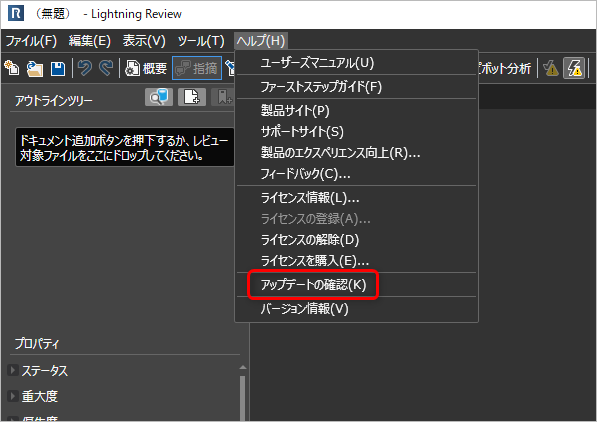
-
When the latest version is notified, click the [Next] button to proceed with the installation.
When upgrading, you must close Lightning Review.
Please save your review before upgrading.
Notes
To perform automatic updates correctly, you must be able to connect to the following domain.
If this fails, please contact your network administrator to allow connection to this domain.