Markdown format outline analysis
Overview
When registering an outline, the results created in Markdown format are automatically analyzed and a table of contents is automatically created.
Here, we will introduce the settings and operation for using "Markdown outline analysis".
Installation
-
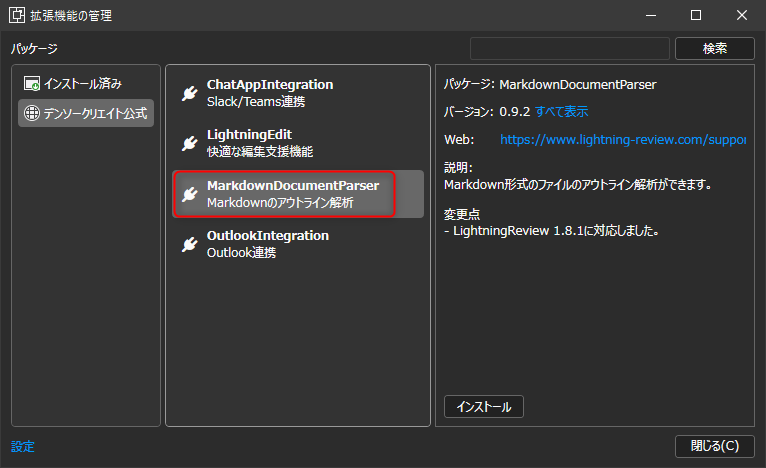
Click the [Tools] menu - [Manage Extensions] to launch the [Manage Extensions] dialog.
-
Select [Markdown Outline Analysis] from [DENSO CREATE Official].
infoYou can find it quickly by typing "Markdown" in the search box.
-
Click the [Install] button.
-
Restart Lightning Review.
How to use
-
Add a Markdown document to the outline tree.
infoYou can add it in the following ways:
- Drag and drop from Explorer
- [Edit] - [Add document from file]
-
Select the document, right-click, and click the [Create outline from document] menu.
Create an outline for a Markdown file
It analyzes Markdown format headings (h1 to h6) and automatically creates an outline tree.
The outline tree that is created will differ depending on the number of headings 1 (h1) in the document, as follows:
-
If there is one heading 1 (h1) in the document
The headings below heading 2 will be the outline tree.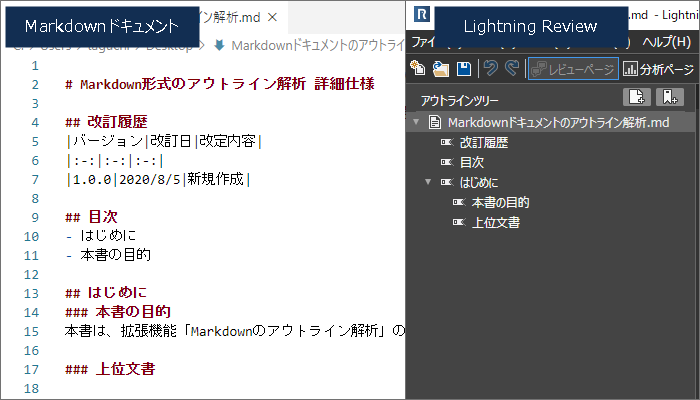
-
If there are multiple headings 1 (h1) in the document
The outline tree will include heading 1.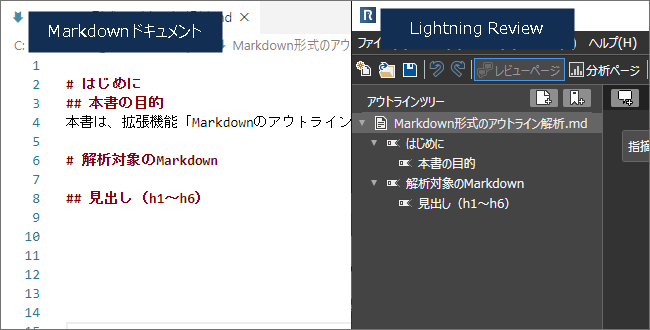
Notes
The extension menu may not be displayed only when you restart the application immediately after installation.
If this happens, please start the application again.