Changes in V2.0
From now on, reviews can be recorded with just Lightning Review
With the major version upgrade to Lightning Review 2.0, Lightning Review This will be a tool that is even more closely aligned with the needs of software development environments. We have implemented many features that meet the requests of our users. We will introduce the new features released this time, divided into four characteristics.
- Lightning Review becomes easier to use even in development environments that utilize GitHub and Subversion
- Achieves flexible reviews that match the processes of the workplace
- Easier sharing of reviews within the team
- Improved user experience
We have also implemented several other improvements in addition to the above. For details, please refer to the following link: Improvements
Anyone currently using Lightning Review can upgrade to this version free of charge. For instructions on how to upgrade, please refer to the following link. : Upgrading Lightning Review
Lightning Review becomes easier to use even in development environments that utilize GitHub and Subversion
You can now view a list of artifacts managed on GitHub and Subversion from Lightning Review and register them as links in documents.
Furthermore, when opening GitHub and Subversion artifacts from document links, the web files open as if they were locally located,
eliminating the need to download files via a web browser.
Other uses include:
-
By registering repository settings in advance, you can view a list of files and individual commits within the registered repository from Lightning Review.
-
When you start a review targeting a file or individual commit from the list, it is automatically added to the document.
The registered document is automatically outline-analyzed. -
You can also link to existing documents from the list of files and individual commits.
For details, please refer to the following link: Configuration Management System Integration
Achieving Flexible Reviews Matching On-Site Processes
Expansion of Custom Fields
Custom fields have been expanded, allowing you to record the following:
- Basic review information and budget/actual results
- Member roles
- Creation, consideration, approval
- Reviewer, expert
You can add and record information required by your project or organization as custom fields.
This allows you to record information that was previously managed in separate files and could not be managed in review files,
and centrally manage information in Lightning Review.
For details, please refer to the following link. : Setting Custom Fields
URL Links Can Now Be Set for Reviewed Documents and Review Comments
Links can now be set for reviewed documents and review comments.
- Links to the main document under review, as well as links to the revised document, related documents, and reference materials can be set.
This allows reviewers to quickly open and review relevant documents.
- Links to each comment allow commits to the repository, such as source code, to be recorded on a per-revision basis.
For details, please refer to the following links: "Creating a Review File"/"Performing a Review"
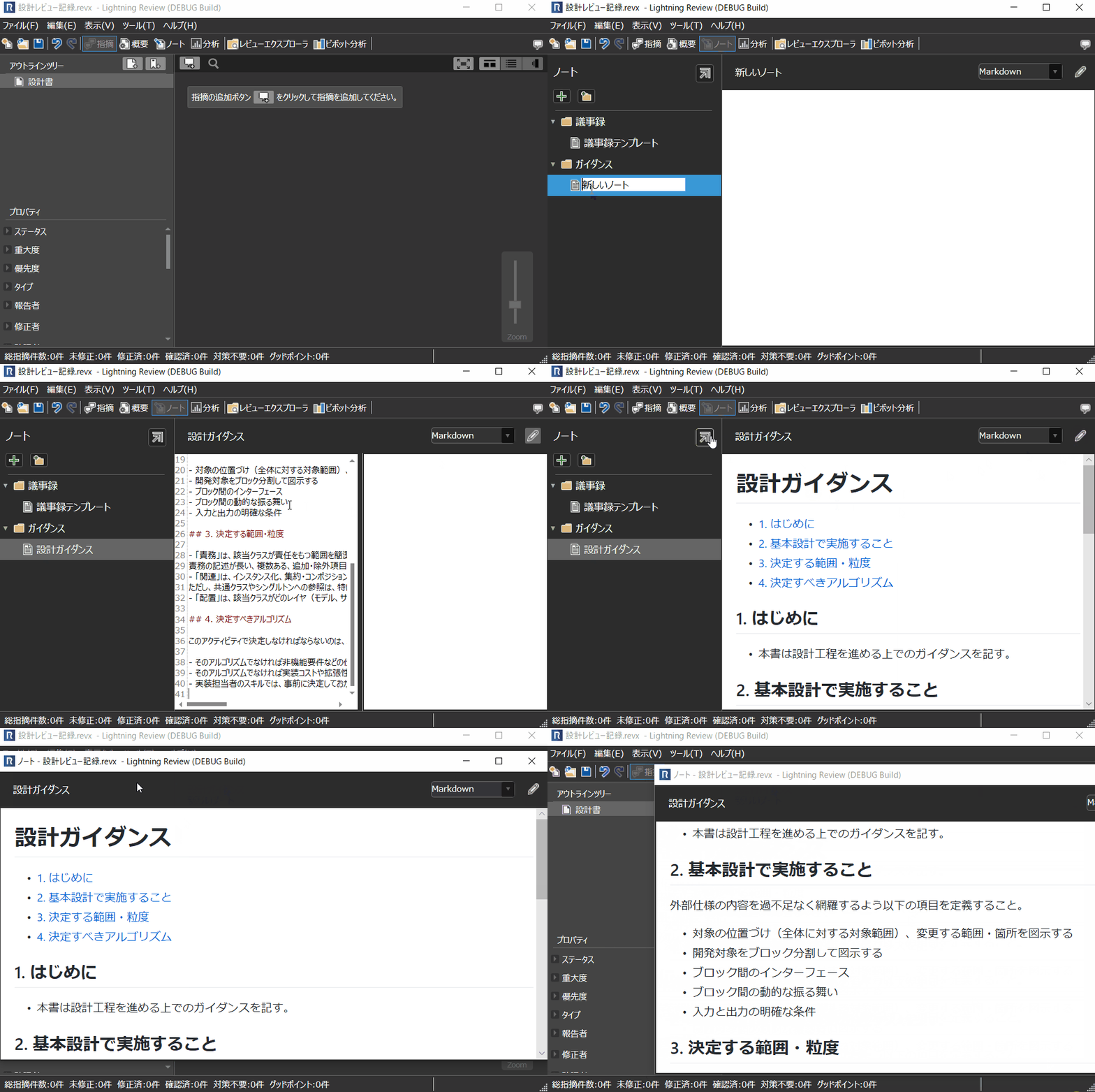
Addition of a "Notes" Function that Can Be Written in Text/Markdown Format
Notes have been added as a function to record information other than comments.
By freely writing in text or Markdown format, the following can be achieved:
- Include review guidelines and conduct reviews while referring to those guidelines.
- Include self-check points and check them in the notes before the review.
This allows you to record and manage process compliance status and other aspects that were previously not manageable in the review file.
For details, please refer to the following link: Utilizing Notes
Easy Sharing of Team Reviews
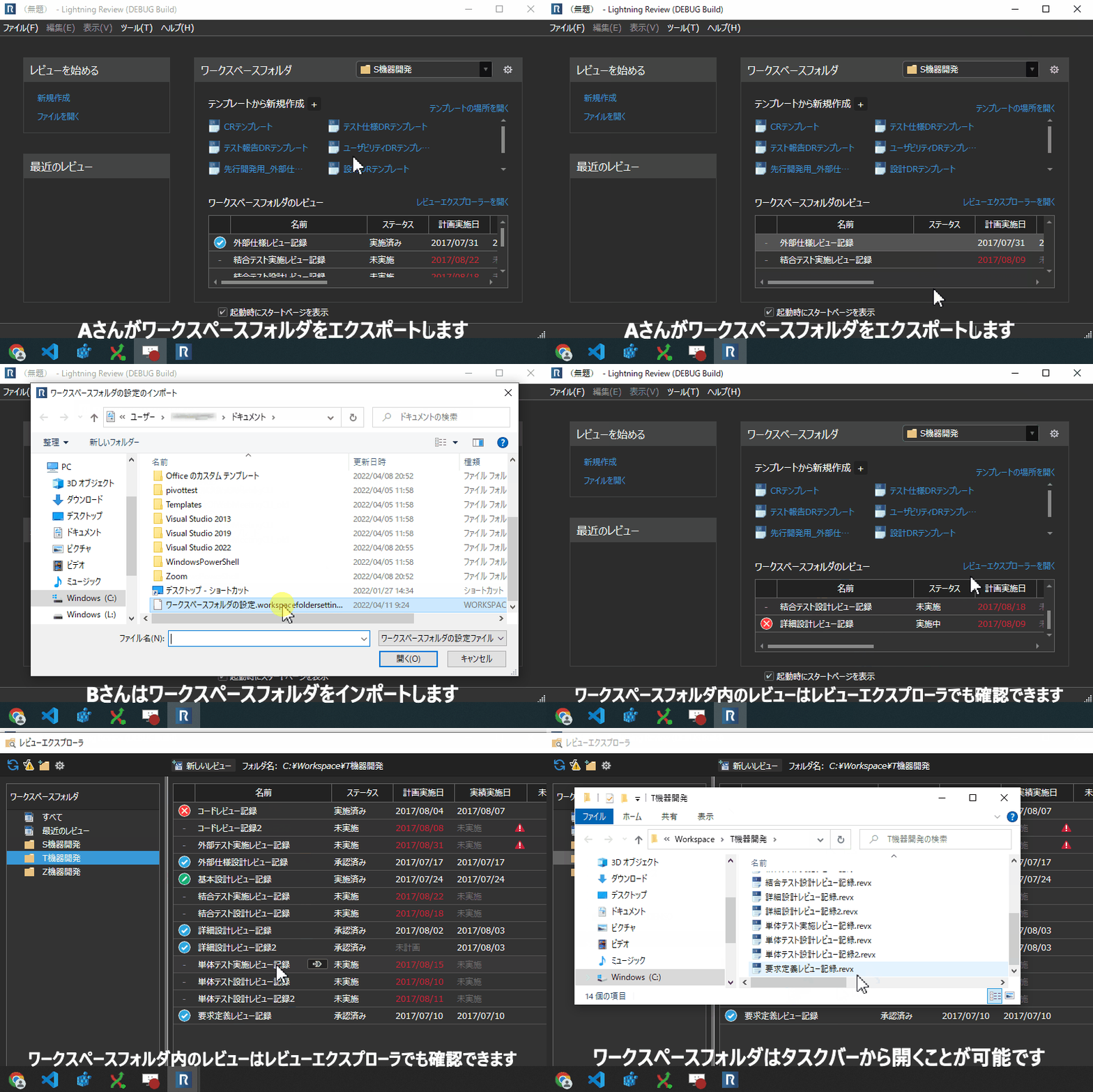
Sharing Team Review Status with Workspace Folders
Folders displayed in the Review Explorer can be treated as workspace folders for sharing review files with the team.
Furthermore, by exporting and importing the registration information of the workspace folder, you can easily share the team's review status and templates.
For details, please refer to the following link: Sharing Team Reviews
Standardizing Review Processes to Suit Users with Template Functionality
Lightning Review now allows you to create template files and share them with projects and team members.
Template files previously held by individual users can now be treated as the standard project template.
Furthermore, you can revise processes and templates while developing and apply them directly to the project.
For details, please refer to the following link: Preparing Templates
Improving User Experience
With the motto "Easier to see" and "Easier to use," we have added a start page and an overview page.
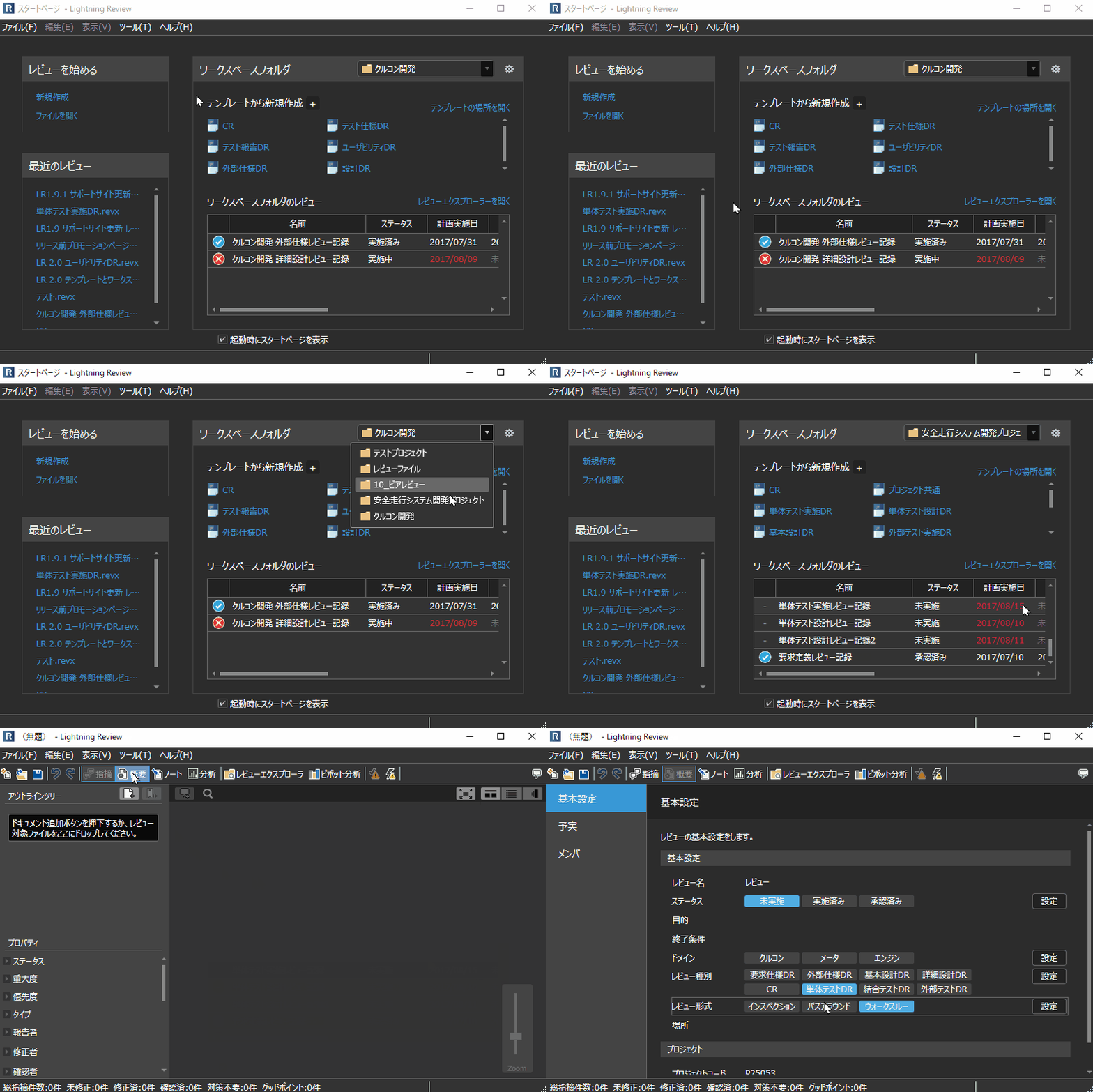
Start Page
The start page is displayed when Lightning Review is launched.
This start page allows you to see the status of all reviews in the workspace folder.
This makes it possible to check the progress of reviews and follow up on reviews that are behind schedule.
Furthermore, you can set templates in your workspace folder.
For example, by registering "templates customized for each process" used by your team, you can immediately start reviews that match the process.
For details, please refer to the following link: Start Page
Overview Page
The following items can be set on the overview page.
Settings that were previously done in a small dialog called the "Review Settings Dialog" have been made more user-friendly.
- Basic review settings, planned vs. actual, member editing
- Customization function (customization of custom fields for comments, etc.)
- Review status
For details, please refer to the following link. : Setting Basic Review Information
Improvements
In addition to the feature additions and changes listed above, numerous other improvements have been implemented.
- Relative paths can now be set for file paths.
- Lightning Review files stored in folders with only read permissions can now be opened.
- The date input calendar now displays in monthly increments.
- The outline tree can now be expanded/closed in bulk.
- The width of the comment and return reason fields can now be increased.
- The display name of the custom text is now displayed next to "Custom Text N" in the "Change Display Order of Properties" dialog.
- The display of columns, column order, and column width can now be remembered in the review grid on the "Start" page and in the "Review Explorer".