When the same path exists in the outline tree, the position of the issues changes when the review file is reopened.
Target Function, Version
Lightning Review 1.8 and later
Phenomenon
When multiple outline paths with the same string exist in the Lightning Review outline tree, issues registered in the second and subsequent outline paths move to the first path when the LR file is reopened.
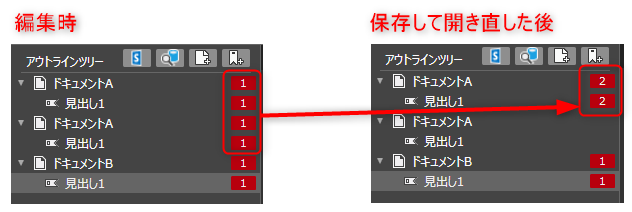
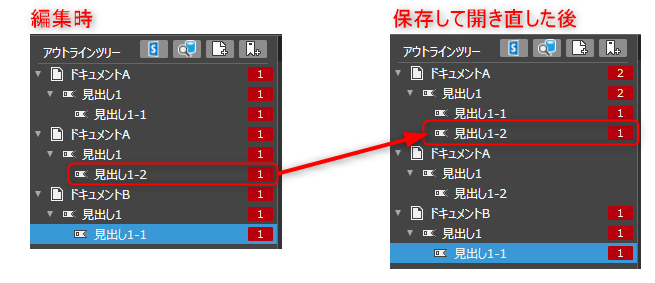
Also, if they are not exactly identical but have a prefix match (the outline paths match from the beginning to partway through), the differing paths (and the issues they contain) are merged into the prefix-matching path.
However, the original outline path also remains.
What is an Outline Path?
An outline path is a string combining document names and headings used to identify the location where a comment has been registered in the Lightning Review outline tree.
It is displayed as a hierarchy in the outline tree.
Conditions for Occurrence
This occurs when opening a review file saved under the following conditions:
- There is an exact match or a prefix match among the outline paths registered in the Lightning Review outline tree.
- A comment has been registered in the corresponding outline path.
Workaround
Please avoid this issue using one of the following methods:
-
Change the outline path
Rename the document or outline to eliminate duplication. -
Split the review file by outline
Manage outlines with the same path name by registering them in separate review files. -
Rename the target file and re-register it in the outline.
By default, the document name is the same as the file name, so if the file name is unique, the document name will also be unique.